Most standing desks come in a handful of sizes, and the right one depends on three measurements: how wide your screens are, how far they need to sit from your face, and how tall you are. Get the first two wrong and you’ll be cramped. Get the third wrong and the desk won’t go low or high enough for you, which no amount of cushioning or monitor-arm fiddling will fix.
Here’s what to measure, with the numbers in centimetres (inches in brackets).
Common standing desk sizes
| Top size | Good for |
|---|---|
| 100 to 110 x 50 to 60cm (39 to 43 x 20 to 24in) | A laptop, or a laptop and a small monitor |
| 120 x 60cm (47 x 24in) | A laptop and one monitor, with a keyboard in front |
| 120 x 80cm (47 x 31in) | One large monitor, with room for notes |
| 140 x 70 to 80cm (55 x 28 to 31in) | Two monitors, and a good all-round size |
| 160 x 80cm (63 x 31in) | Two monitors plus a laptop, or a big ultrawide |
| 180 x 80cm (71 x 31in) | Two people’s worth of kit, or a desk you also spread paper across |
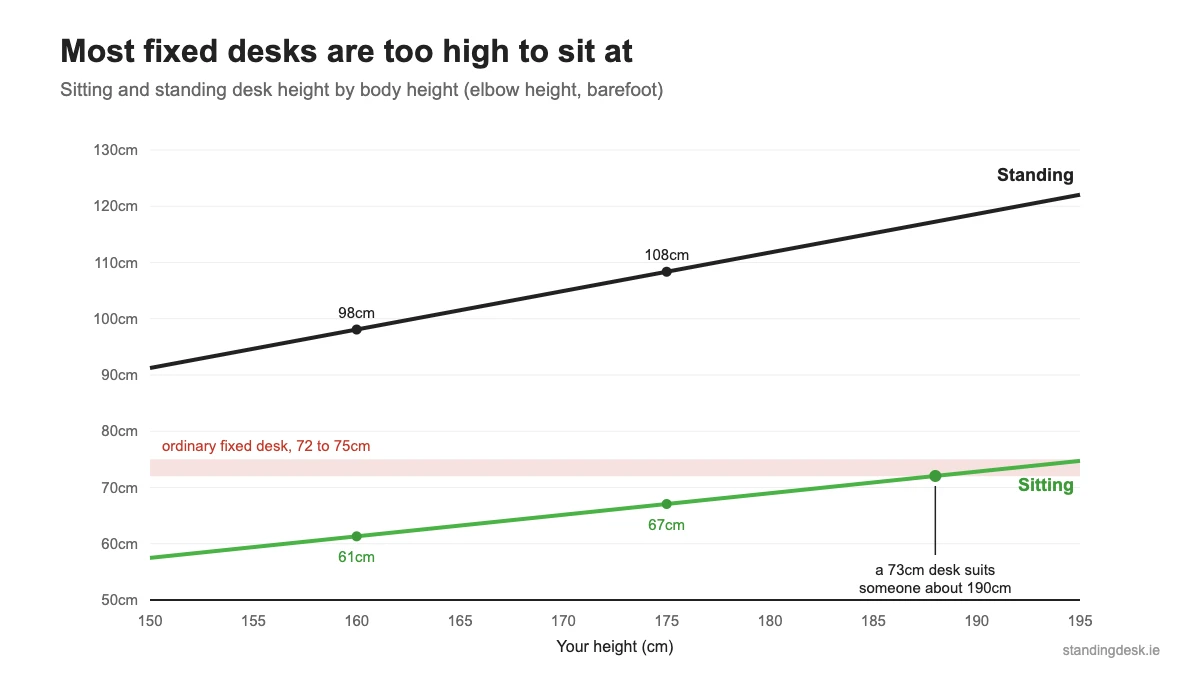
If you’re not sure, 140 x 80cm is the size we’d pick for most people working from home. It fits two monitors, and the 80cm depth keeps them a sensible distance from your eyes.
Width: start with your screens
Measure the screens you’ll actually use, not the desk you think you want. Approximate widths for common monitors, before you add the stand:
| Screen | Width |
|---|---|
| 24-inch (16:9) | 53cm (21in) |
| 27-inch (16:9) | 60cm (24in) |
| 32-inch (16:9) | 71cm (28in) |
| 34-inch ultrawide (21:9) | 79cm (31in) |
| 14 to 16-inch laptop | 32 to 36cm (13 to 14in) |
Two 27-inch monitors side by side take up about 120cm before you leave any gap between them. That’s why we say two monitors need a top of 140cm or more. A 120cm desk technically holds them, but the screens will hang over the ends and there’s nowhere to put a phone.
Leave some space for the things that aren’t screens. Speakers, a lamp, a notebook and a mug all need somewhere to go, and on a standing desk anything balanced on the edge falls off when the desk moves.
Depth: 60cm is the minimum, 80cm is better
Depth is the measurement people overlook, and it’s the one that makes a desk feel cramped. The usual advice is to keep your eyes 50 to 100cm (20 to 40in) from the screen, according to OSHA’s computer workstation guidance.
On a 60cm-deep top, the keyboard and the monitor stand use up most of the depth, and you can’t push a big screen further back when it feels too close. An 80cm top gives you that room without making you stretch for the keyboard.
Shallow desks still have their place. A 50 to 60cm top suits a laptop, a narrow room or a desk under a window, as long as you aren’t running a big monitor. If you want a big screen on a shallow desk, a monitor arm lets you push it back towards the wall.
Height: measure your elbows, not your height
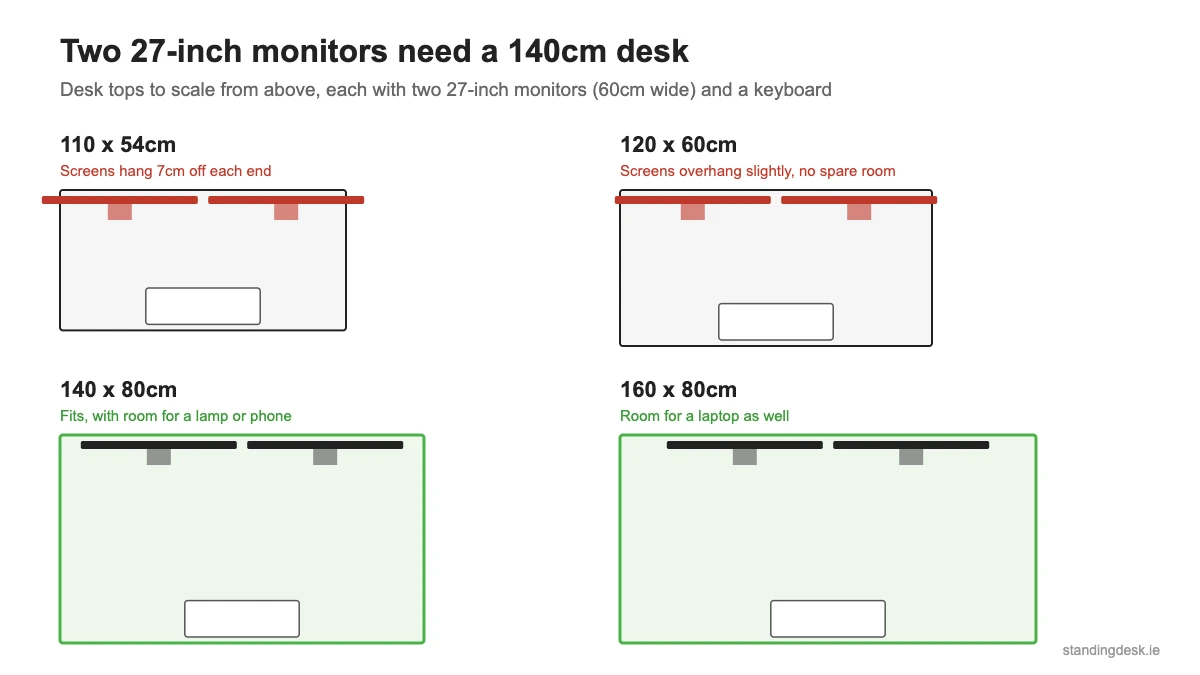
The right desk height is where your forearms rest level with your elbows bent at about 90 degrees and your shoulders relaxed. To measure it:
- Stand up straight, barefoot or in the shoes you’ll wear at the desk.
- Let your arms hang, then bend your elbows to 90 degrees.
- Measure from the floor to the underside of your forearm. That’s roughly your standing desk height.
- Do the same sitting on your desk chair, with your feet flat on the floor. That’s your sitting desk height.
The keyboard adds a couple of centimetres on top, so the desk can sit at your elbow height or a little lower.
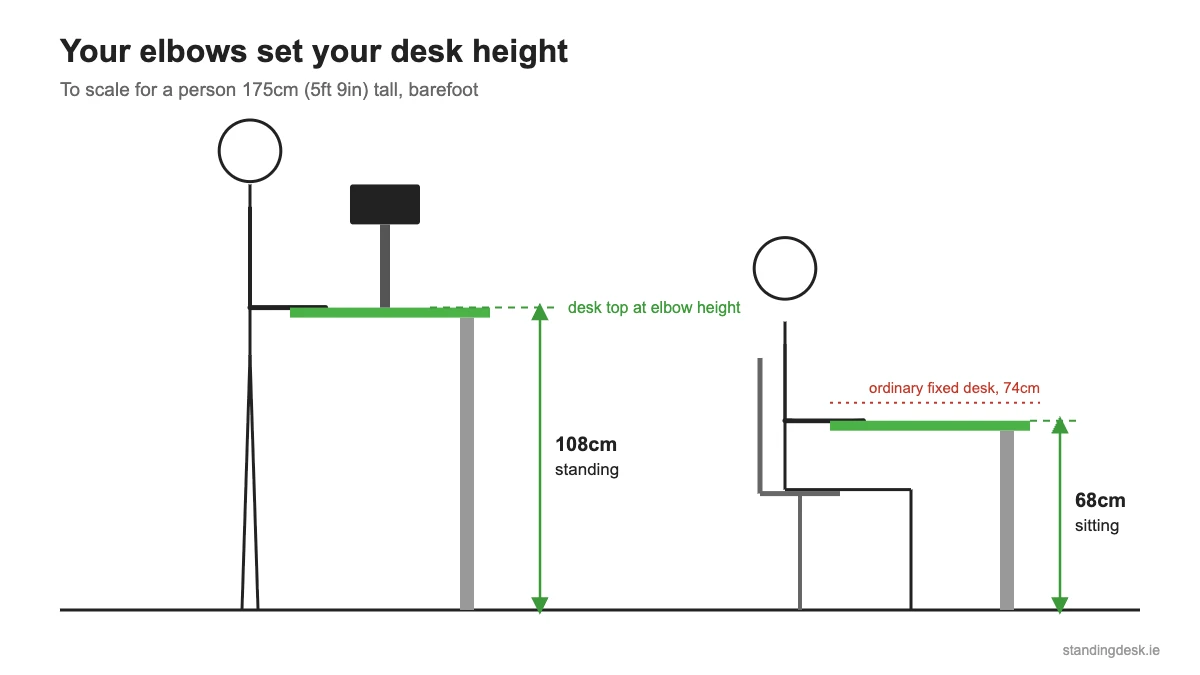
If you can’t measure yet, this chart gives rough elbow heights by body height. We worked it out from the US Army’s 2012 anthropometric survey, as summarised by the Ergonomics Center of North Carolina. It’s for bare feet, so add 2 to 3cm for shoes. Your chair, your proportions and your posture will move it by a few centimetres either way.
| Your height | Sitting desk height | Standing desk height |
|---|---|---|
| 150cm (4ft 11in) | 57cm (22.5in) | 91cm (36in) |
| 155cm (5ft 1in) | 59cm (23in) | 95cm (37.5in) |
| 160cm (5ft 3in) | 61cm (24in) | 98cm (38.5in) |
| 165cm (5ft 5in) | 63cm (25in) | 102cm (40in) |
| 170cm (5ft 7in) | 65cm (25.5in) | 105cm (41.5in) |
| 175cm (5ft 9in) | 67cm (26.5in) | 108cm (42.5in) |
| 180cm (5ft 11in) | 69cm (27in) | 112cm (44in) |
| 185cm (6ft 1in) | 71cm (28in) | 115cm (45.5in) |
| 190cm (6ft 3in) | 73cm (28.5in) | 119cm (46.5in) |
| 195cm (6ft 5in) | 75cm (29.5in) | 122cm (48in) |
Look at the sitting column. Most ordinary desks are 72 to 75cm high, which suits someone around 185 to 195cm tall and is too high for most other people. That’s one reason a height-adjustable desk helps even when you’re sitting down.
For the monitor, the top of the screen should be at or slightly below eye level, according to OSHA’s guidance. If you work on a laptop, that means a laptop stand and a separate keyboard, because a laptop flat on the desk puts the screen far too low.
The height range to look for
Once you know your two heights, check them against the desk’s height range. The range is the lowest and highest the top will go, and it’s the specification budget desks are most likely to skimp on.
The bottom of the range matters for shorter people. Many budget frames don’t go below about 72cm, which is too high for most people to sit at unless they raise the chair and use a footrest. If you’re under 165cm, look for a desk that goes down to about 62cm.
The top of the range matters for tall people. A desk that stops at 117 or 118cm is fine up to about 185cm tall in shoes. Above that, look for 125cm or more.
Desks with three-section legs usually cover a wider range than those with two. If the listing doesn’t give the range at all, ask before you buy.
Space around the desk
A desk that moves needs more room than one that doesn’t.
Measure under the window if that’s where the desk is going. In a lot of Irish houses, a radiator and a deep windowsill stop a desk sitting flush against the wall. The top needs a few centimetres of clearance at the back so it doesn’t catch the sill on the way up.
Cables need slack. Everything plugged into the desk travels 40cm or more between sitting and standing, so measure from your sockets with the desk at full height. A cable tray under the top keeps the extension lead moving with the desk.
Check the feet as well as the top. The feet on most frames run almost the full depth of the desk, and they decide where your chair’s wheels can go.
The top itself
Thickness tells you something about quality. Budget tops can be as thin as 15mm, which is what the FlexiSpot Lite uses. Better desks use 25mm tops, including solid wood ones like ErgoHide’s. A thin top is fine for a laptop and a monitor on a stand, but it can flex under a heavy monitor arm clamped to the edge.
Some cheap desks use two half-tops joined in the middle. You can feel the seam under your wrists, and you shouldn’t clamp a monitor arm across it. If the listing says “one-piece top”, that’s what it’s telling you.
Standing desk converter sizes
If you’d rather keep your current desk, a converter sits on top of it. The same width rules apply, but the lift is added to your existing desk height.
| Converter | Top | Lift above your desk |
|---|---|---|
| ERGOMAKER mini | 55 x 40cm | 13 to 39cm |
| VIVO 81cm | 80 x 40cm | 11.4 to 50.8cm |
| ERGOMAKER 91cm | 91 x 40cm | 12 to 52cm |
On a standard 73cm desk, add the lift to find your standing height. The mini converter tops out at about 112cm, and the bigger two at about 124 to 125cm.
Desk sizes you can buy in Ireland
These are the desks from our standing desk guide, with their sizes and height ranges as listed when we checked in October 2026.
| Desk | Top size | Height range |
|---|---|---|
| FlexiSpot Lite | 110 x 54cm, bigger sizes available | 60 to 117cm |
| HOMCOM electric desk | 140 x 60cm | 72 to 118cm |
| Viking Realspace | 140 x 80cm or 160 x 80cm | 65 to 130cm |
| IKEA MITTZON | 120 x 80cm or 140 x 80cm | 62 to 126cm |
| HuntOffice Core Electric | 120 x 80cm or 140 x 80cm | 73 to 121.5cm |
| FlexiSpot EC5 Pro | 140 x 80cm | 62 to 127cm |
| Oakywood | 120 x 60cm to 170 x 85cm | 63 to 132cm, depending on model |
| ErgoHide | 120 x 80cm to 180 x 80cm | 63 to 128cm |
Questions people ask
What is the standard size of a standing desk?
There isn’t one standard size. Among the desks you can buy in Ireland, 120 x 80cm and 140 x 80cm come up most often. For most home offices, 140 x 80cm is the safest choice.
How deep should a standing desk be?
At least 60cm, and 80cm if you use a monitor of 27 inches or more. Below 60cm, stick to a laptop or a small monitor.
What height should a standing desk be for someone 178cm (5ft 10in) tall?
About 110cm standing and 68cm sitting, barefoot. Add 2 to 3cm for shoes, and measure your own elbow height to be sure.
Is 120cm wide enough for two monitors?
Two 24-inch monitors fit on 120cm with a little room to spare. Two 27-inch monitors take up about 120cm on their own, so go for 140cm or more.
What height range should a standing desk have?
For most people, a range of about 62 to 125cm covers both sitting and standing. If you’re under 165cm, look for a desk that goes down to about 62cm. If you’re over 185cm, look for one that goes above 125cm.
Still deciding whether you need one at all? Read should I buy a standing desk? And if you’ll be standing on a hard floor, see our anti-fatigue mat guide.